Agent-Driven Design
How we're building Rosette from the ground up for AI agents, and why it matters for photonic chip design.
Early days
Rosette is still early. The API is unstable, things will break, and there's a lot of ground to cover. If this direction resonates with you, the best way to follow along is to watch the GitHub repo. We're building in the open. Contributions, feedback, and sharp questions are all welcome.
The shift
A year ago, AI-assisted coding meant tab-completing a few lines of boilerplate. Today, agent harnesses like Claude Code and OpenCode work differently. They read your codebase. They write the code. They run it, find the bugs, fix them, and commit. You steer; they build.
This changes how software gets made. And the tools keep getting better, quickly enough that it's worth designing around the assumption that they will be meaningfully more capable a year from now.
The same shift is happening in chip design. Specifically, photonic chip design, where the physical layout of waveguides, splitters, and couplers is increasingly defined in code rather than drawn by hand.
As chip development becomes more code-driven, agent-driven workflows follow naturally. That's what we're building for.
Building for agents from the ground up
When we started building Rosette, we had a choice: add AI capabilities to a traditional design tool, or design the entire system with agents in mind from day one.
We chose the latter. Every part of the system (the API, the project structure, the verification pipeline) is built with the assumption that an AI agent will be a primary operator. Not instead of humans, but alongside them. These aren't conflicting goals. What makes a system legible to an agent (clear API, structured config, verifiable output) also makes it better for humans.
Importantly, this doesn't mean building a custom agent or a proprietary chat interface. Agent harnesses like Claude Code, OpenCode, and Cursor already handle the hard parts well: reading codebases, writing code, running commands, iterating on errors. We don't need to reinvent that. We just need to give them the right material to work with.
Three things an agent needs
For an agent to do useful work, it needs three things:
Instructions. What are the rules? What's the workflow? What should it always do before declaring something "done"?
Context. What does the API look like? What layers exist? What are the design rules? What components are available and how do they connect?
Tools. How does it check its own work? How does it know it's actually done, not just "the script ran without errors" done, but "this design is physically correct" done?
Any one of these on its own is useful. But the real leverage comes when all three come together: the agent has clear instructions, full context, and a way to verify its own work.
Here's what this looks like in a Rosette project. When you run rosette init and pick your agent tool, the project receives a small context system:
AGENTS.md — the instruction file. It sends the agent to a compact task index, keeps design scripts compositional, and requires verification before the work is complete.
.rosette/index.md and .rosette/contracts/ — the index routes layout, routing, verification, and component-authoring tasks to focused API contracts. Those contracts are derived from the complete .rosette/api.pyi, so signatures still have one source of truth without forcing every subsystem into the initial context.
rosette.toml — project configuration. Layer definitions, DRC rules (min width, min spacing, overlap constraints), DFM settings. The physical constraints of the design, machine-readable.
components/ — the component library. Editable source code for every building block: waveguides, bends, MMI splitters, grating couplers. The agent can read how each component works, what ports it has, and how to connect them.
Focused skills — actionable routing, verification, and component-authoring workflows installed where the selected agent harness can discover them.
And then the verification loop: rosette build produces the GDS layout. rosette check runs DRC and connectivity checks against it. The agent builds, checks, reads the violations, fixes them, and runs again, autonomously.
It's worth noting what's not on this list. No custom or fine-tuned LLM. No MCP servers. No dedicated agent harness. No paywall. Everything the agent needs is included in the project itself: plain files it can read with the tools it already has. This works with Claude Code, OpenCode, Cursor, or whatever comes next because we're not coupling to any particular agent runtime.
The philosophy is simple: give the agent the right instructions, context, and tools, and don't add unnecessary layers between it and the work.
This same pattern is showing up elsewhere. Vercel's engineering team found that replacing custom retrieval tooling with structured files and bash outperformed their previous approaches for agent context management. The domain is different, but the principle is the same: LLMs already know how to navigate filesystems. Give them well-structured files and they do the rest.
Pure geometry
Let's start with something simple. No photonics, no components. Just shapes on a layout.
Generate a test layout with a few different geometries, using a few different layers, and some cell instancing.That's it. A single sentence. The agent reads .rosette/index.md, rosette.toml, and the focused layout and routing context, then produces a layout with multiple reusable child cells (waveguide sections, metal pads, hexagons, a ring, alignment crosses, triangles) placed across four layers with rotation, mirroring, routing, arc paths, and a custom star polygon. Here's a trimmed version of what it wrote:
import math

from rosette import Cell, Layer, Point, Polygon
from rosette.routing import Route

WAVEGUIDE = Layer(1, 0)
METAL = Layer(10, 0)
SLAB = Layer(2, 0)
LABEL = Layer(100, 0)

# Reusable child cells
def metal_pad(width=20.0, height=10.0):
    cell = Cell("metal_pad")
    cell.add_polygon(Polygon.rect_centered(Point(0, 0), width, height), METAL)
    return cell

def hex_marker(radius=5.0):
    cell = Cell("hex_marker")
    cell.add_polygon(Polygon.regular(Point(0, 0), radius, 6), SLAB)
    return cell

def alignment_mark(arm_len=15.0, arm_w=2.0):
    cell = Cell("alignment_mark")
    cell.add_polygon(Polygon.rect_centered(Point(0, 0), arm_len, arm_w), METAL)
    cell.add_polygon(Polygon.rect_centered(Point(0, 0), arm_w, arm_len), METAL)
    return cell

# ... plus waveguide_section, ring, triangle_marker

design = Cell("test_layout")

# Place waveguide sections, connect with S-bend route
wg1 = wg_cell.at(0, 0)
wg2 = wg_cell.at(50, 0)
design.add_ref(wg1)
design.add_ref(wg2)

route = Route(WAVEGUIDE, width=0.5, bend_radius=10.0)
route.start_at_port(wg2.port("out"))
route.to(120, 0)
route.to(120, 30)
route.end_at(150, 30, angle=0)
design.add_ref(route.to_cell("s_bend_route").at(0, 0))

# Instance with transforms: rotation, mirroring
design.add_ref(pad_cell.at(0, 0).rotate(45).translate(180, -30))
design.add_ref(pad_cell.at(0, 0).mirror_x().translate(180, 30))

# Alignment marks at corners, hex markers along a diagonal, ...
for x, y in [(-60, 70), (-60, -70), (240, 70), (240, -70)]:
    design.add_ref(cross_cell.at(x, y))
The agent builds it, runs checks, gets a few unconnected-port violations (expected for a geometry demo, not a circuit), fixes them by exposing those ports as top-level I/O, and runs again:
$ uv run rosette check designs/test_layout.py

  drc   0 rules, 2 polygons — passed
  checks   8 ports, 1 connections, 2 bends — passed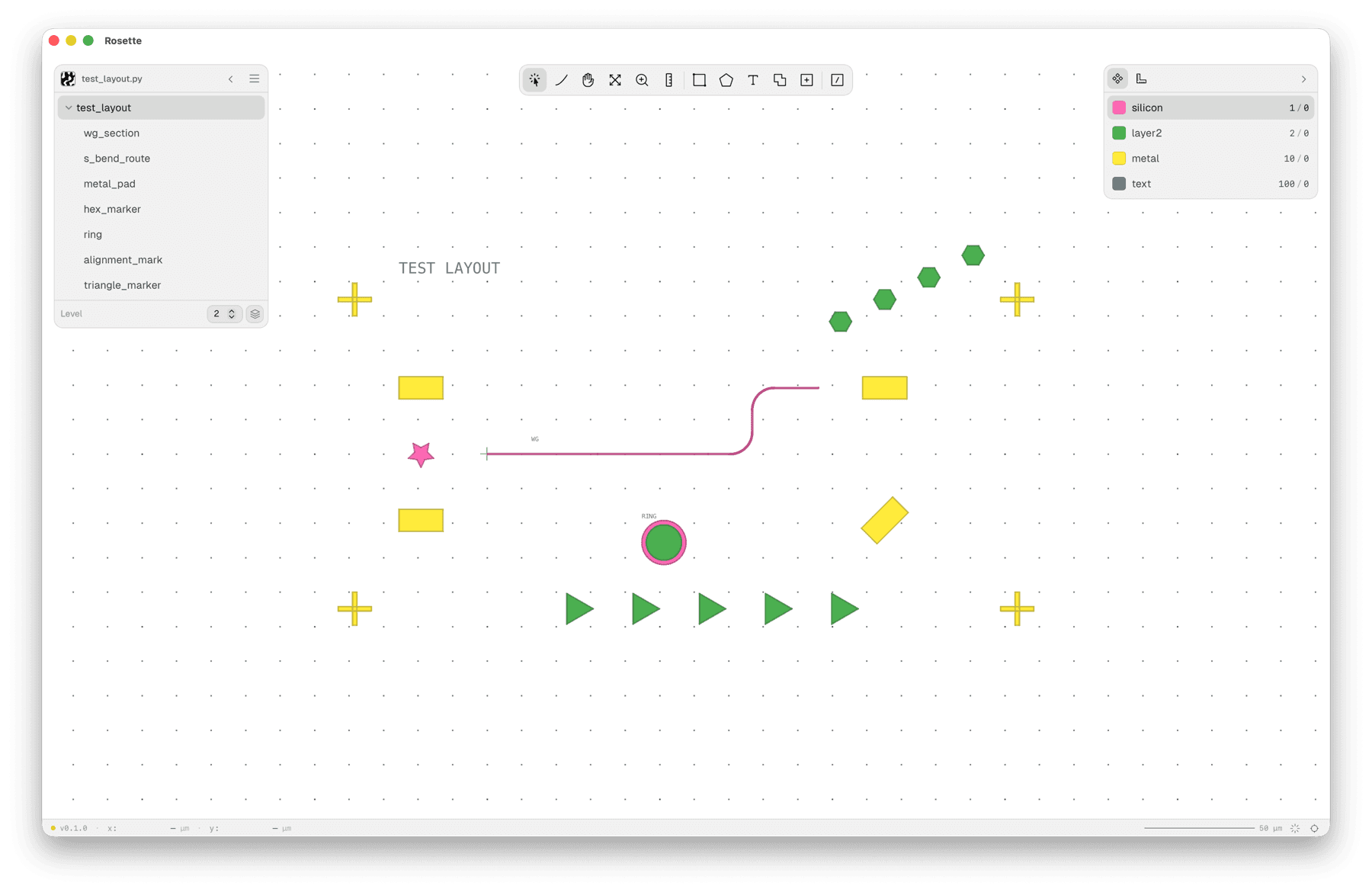
Twenty-two cell references, four layers, rotations, mirrors, routes, arcs, custom polygons, all from a one-sentence prompt. For purely geometric layouts, the workflow holds up well. The agent reads the API, writes the script, runs into issues, fixes them, and delivers a clean build.
Worth noting: this is the extreme end of vague prompts. The output exercises the API, but it's not something you'd fabricate. More specific intent produces more useful designs, as the next examples show.
A fiber loopback
Now let's add photonics. Something like the "hello world" of photonic design is a fiber loopback: two grating couplers connected by a waveguide route. Light comes in through one fiber, travels through the chip, and comes back out through the other.
Design a simple grating coupler loopback.Six words. The agent follows .rosette/index.md to the layout and routing contracts, then reads rosette.toml and the relevant components/ source. It finds grating_coupler, reads the docstring (port "opt" faces +X, grating body extends in -X, 127 µm fiber pitch), and writes:
from rosette import Cell, Layer
from rosette.routing import Route
from components import grating_coupler

layer = Layer(1, 0)
gc = grating_coupler(layer, waveguide_width=0.5)

gc_in = gc.at(0, 0)
gc_out = gc.at(0, 127)

mid_x = 2 * 10.0 + 5.0  # Room for two 10 um bends

route = Route.through(
    gc_in.port("opt"),
    (mid_x, 0),
    (mid_x, 127),
    gc_out.port("opt"),
    layer=layer,
    width=0.5,
    bend_radius=10.0,
)

design = Cell("loopback")
design.add_ref(gc_in)
design.add_ref(gc_out)
design.add_ref(route.to_cell("route").at(0, 0))
On its first attempt, the agent set mid_x too small. The build warned that the bend radius was auto-reduced from 10 µm to 4.5 µm. It read the warning, understood the geometry, increased the horizontal extent, and rebuilt clean. Then it ran checks:
$ uv run rosette check designs/loopback.py

  drc   23 rules, 57 polygons — passed
  checks   4 ports, 1 connections, 2 bends — passed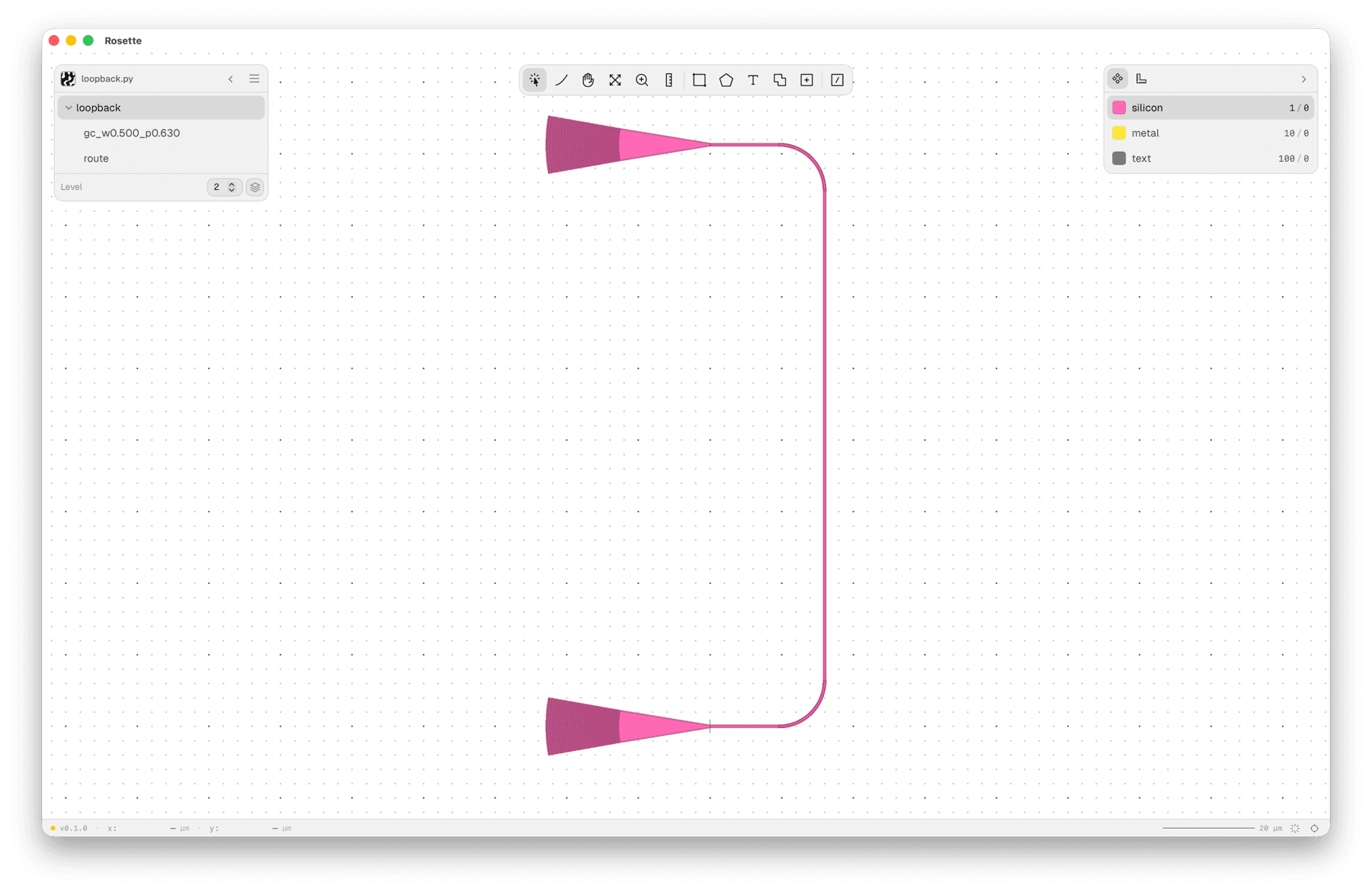
A few things to notice. The agent didn't hallucinate the API. It loaded the focused contracts generated from .rosette/api.pyi. It knew that grating couplers need 127 µm spacing because that detail lives in project-local component source. It caught a geometric issue in the bend radius, used the routing and verification workflows, and iterated without human intervention.
This is what "context" does. The agent reads the API, the constraints, and the conventions before writing a line of code.
A 1x16 splitter tree
Now the slightly more complex case. A 1x16 MMI splitter tree: one input splits into 16 outputs via four stages of MMI 1x2 splitters, with grating couplers on all 17 ports, all aligned on the right side at 127 µm fiber pitch.
This is a good stress test. A splitter tree isn't conceptually hard, but it's the kind of large, structural layout that's tedious to do by hand and non-trivial to script. Fifteen splitters, thirty routed connections, seventeen grating couplers fanned out to fiber pitch. All of it has to connect correctly, satisfy DRC, and respect bend radius limits. An agent can hold the full structure in context and iterate on the whole thing at once.
Design a 1x16 MMI tree using 1x2 MMIs, with grating couplers attached at the ends.The agent reads the component library, understands the MMI port layout (in at the left, out1/out2 at the right with 2 µm separation), and builds the tree stage by stage. Four stages of splitting, S-bend routes fanning out between each stage, and all 17 grating couplers placed in a column on the right at 127 µm pitch. The input GC at the bottom connects back to the first MMI with a U-turn route.
On the first pass, the output GCs were split between left and right sides. We asked the agent to make them all inline on the right, which meant updating the GC placement and route. It rewrote the layout, rebuilt, and checked:
$ uv run rosette build designs/mmi_tree_1x16.py

  mmi_tree_1x16 | hierarchical | 64 cells | 17 ports
  ok output/mmi_tree_1x16.gds

$ uv run rosette check designs/mmi_tree_1x16.py

  drc   15 rules, 0 polygons — passed
  checks   141 ports, 48 connections, 60 bends — passed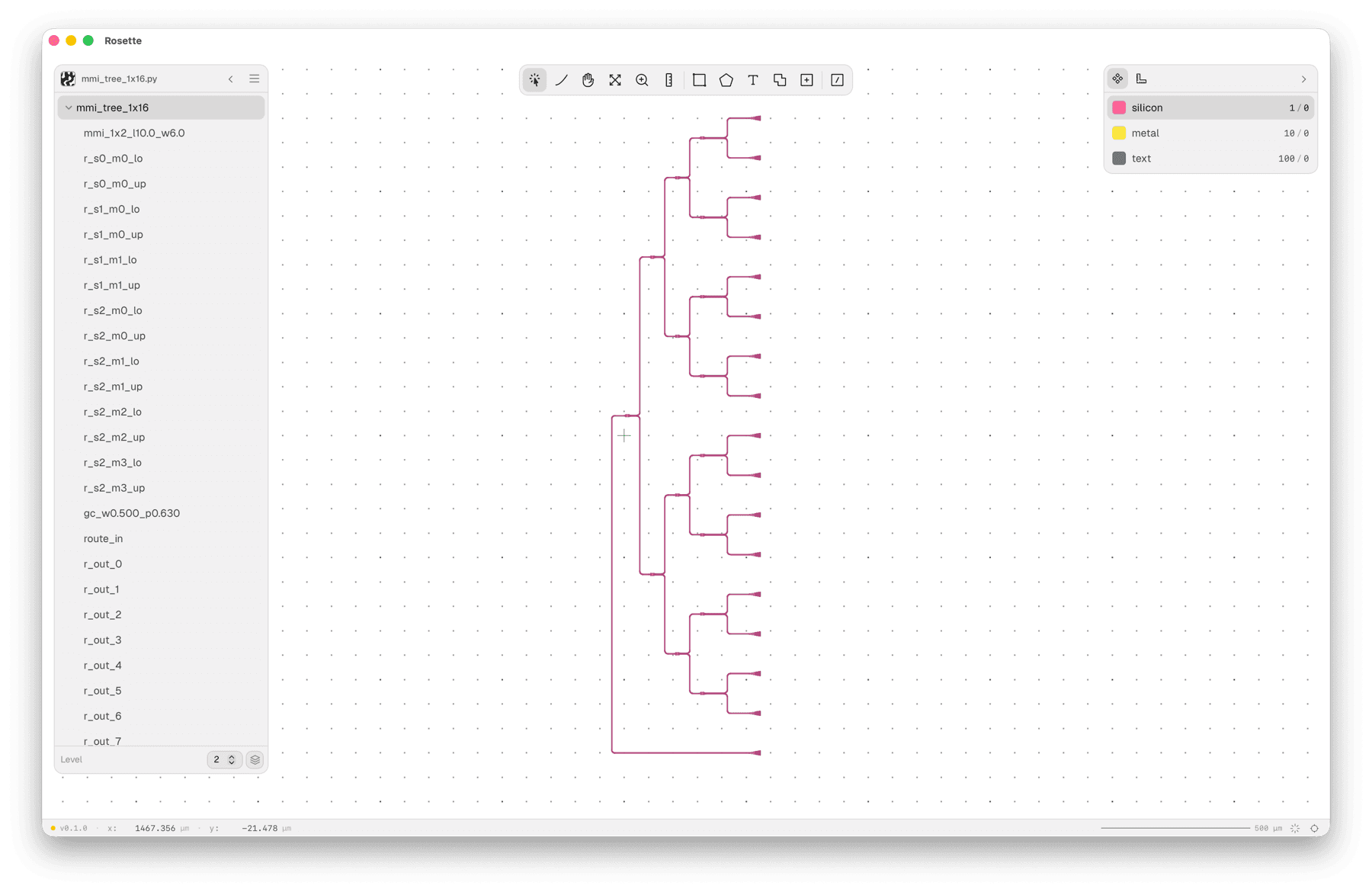
Sixty-four cells in the hierarchy, 141 ports checked, 48 connections verified, 60 bends within limits. The agent built it, we asked for a layout change, and it updated the design without breaking a single connection.
Try it yourself
uvx --from librosette rosette init my-design
cd my-design
Pick your agent tool (OpenCode, Claude Code), open the project, and start prompting. The agent instructions, API reference, and component library are already there.
Full setup guide: Installation
What's hard
This isn't a solved problem.
For pure geometric layouts (test structures, alignment marks, parametric sweeps), agent-driven design works well today. The design space is constrained, the verification is straightforward, and the API surface is small enough that the agent rarely gets lost.
For photonic chip design, it's harder. There are more abstractions. More foundry-specific rules. More configurations that interact in non-obvious ways. More things that can go wrong in ways that aren't captured by a min-width DRC check. Process design kits, simulation-driven optimization, multi-layer stacks with complex inter-layer constraints.
These are hard problems. But they're tractable, and the tools are improving fast.
The bet we're making is that the right architecture (agents with the right instructions, full context, and self-verification tools) will compound as the models improve. We don't need to wait for some future breakthrough. We need to build the scaffolding now so that each improvement in agent capability translates directly into better designs with less human intervention.